Posts mit dem Label n900 werden angezeigt. Alle Posts anzeigen

Mittwoch, 15. Oktober 2025

Dzzee 1.9.0 for N800/N810/N900/N9/Leste

I was playing around with Xlib this summer, and one thing led to another, and here we are with four fresh ports to retro mobile X11 platforms. There is even a Maemo Leste port, but due to some SGX driver woes on the N900, I opted for using XSHM and software rendering, which works well and has the nice, crisp pixel look (on Fremantle, it's using EGL+GLESv2). Even the N8x0 port has very fluid motion by utilizing Xv for blitting software-rendered pixels to the screen. The game is available over at itch.io.


Dienstag, 14. Mai 2013

HTML5 Web Apps on Mobile Devices

Get out your Buzzword Bingo cards, we're talking HTML5. And Canvas2D. And WebGL. See? Check them off and then continue reading. So, while writing "native" apps using JavaScript is definitely possible and works great with QML, some games are just simple enough (or want to have a broad enough audience) to warrant writing everything in HTML5.

This might also be a good time to check off XmlHttpRequest on your BB card, even if none of the following games use it - you might want to use it in your applications or game for things such as server-side stored high scores.

As far as Maemo and MeeGo is concerned, you might want to try out some of these games (especially the WebGL variant of One Whale Trip) in Fennec (aka Mobile Firefox - get it for: N900, N950/N9, Nemo Mobile).

Color Lines: This one simply uses Canvas2D, and works nicely on all mobile browsers that I tested - Maemo, MeeGo, Android, WP7.5, BB Playbook, iOS. Comes in at about 650 lines of rather well-documented JavaScript, and could easily be ported to use QML as a renderer if need be (it would be good to have a QML Plug-In that provides a JavaScript context + (a subset of) the Canvas2D API - without using WebKit (cross that off, too), that is). Also, the N900's stock browser has performance problems rendering this, while on the same device in Fennec it's quite playable.

Circle1D: This is a straight Python-to-JavaScript port of a lame 2D "Physics" Engine. It's kept very (read: very, very) simple, and collision detection could be done in a nicer way, but the inefficiency of it provides a nice benchmark for comparing JavaScript engine performance (I'm sure you can find "engine performance" on your bingo card as well) on mobile devices. The N900's default browser can't handle it at all, but Fennec can at least render/simulate it, albeit slowly.

One Whale Trip: This game actually started out as a Python game for PyWeek last September, which was also ported to the N950/N9, but as a test for trying out WebGL, I decided to port it from Python/PyGame to JavaScript/Canvas2D and then to WebGL (the Python version also contains two renderers - a "blitting" one using PyGame surfaces, and an OpenGL one using OpenGL [ES 2 on mobile]). The Canvas2D version works again in all modern mobile browsers (same as above), the WebGL only works on browsers supporting WebGL, for example Fennec/Firefox on both the N900 (even though very slowly) and not in any of the stock browsers (even not the one on the N9). As WebGL is "roughly" the same as OpenGL ES 2.x, one could imagine sharing at least shader programs for a possible C++-or-JavaScript cross-platform application.

So yeah, for smaller applications and/or games, HTML5 is definitely an option. In Firefox OS, your HTML5 web app will - also with WebGL - work and integrate nicely as "native" app. If you also want to create "native" applications (maybe after finishing the HTML5 version), consider encapsulating your JavaScript code so that you can re-use it in QML code, or (in case of WebGL apps), at least design the rendering part of your application in such a way that the code/architecture and shader programs can be shared with a C++ port of your existing HTML5 app.

Another option that's worth considering: Writing a compatiblity application layer that can load (specially-crafted) WebGL subset applications and display them on a fullscreen SDL-(or Qt)-provided window. Applications written in this WebGL subset could then be deployed on the web as HTML5 application or "natively" running on top of a JavaScript engine only. I'd call that "webglenv", and no, I haven't written it yet.

Sonntag, 23. Dezember 2012

gPodder 2.20.3 for Maemo 4 and Maemo 5

A new release of gPodder 2.x for Maemo 4 (aka Diablo, N800 + N810) and Maemo 5 (aka Fremantle, N900) is out, fixing YouTube-related issues (again ;).

gPodder 2.20.3 running on Maemo 4 (N810)
Packages have been uploaded to Maemo Extras, but as people have reported problems with the autobuilder, and as maemo.org seems to be moving these days, anyway (to the Hildon Foundation, apparently), we also provide for the first time since.. well, since a very long time I guess.. binary .deb packages for gPodder on Maemo 4 and Maemo 5 :)

gPodder 2.20.3 running on Maemo 5 (N900)
You can find the download links on the gPodder download page - you can directly download gPodder 2.20.3 from the web browser in both OS versions, and choose to open the .deb file with the Application Manager. Be sure to choose the right package for your device (N8x0 users choose the Maemo 4 version, N900 users choose the Maemo 5 version). Enjoy :) Next up: A new release of gPodder 3.x for Harmattan. Soon!

Montag, 24. September 2012

HOWTO: Set up a Maemo 5 Scratchbox SDK VM (and upload packages)

I've somehow lost my good old "MaemoSDK" VirtualBox VM, so while I'm setting up the new VM, here are the instructions in case I or somebody else needs to do that again.

The goal: To have a nice VM (more lightweight than the Maemo SDK VMs offered online) that one can SSH into and build packages for Maemo 4 and Maemo 5:
  1. Get the Debian i386 netinst CD image from http://www.debian.org/CD/netinst/
  2. Create a new VirtualBox VM (Name: MaemoSDK, Operating System: Linux, Version: Debian) - the default size (8 GB) should be okay, less is also okay
  3. Go to Settings, Storage, IDE Controller, select the .iso you downloaded in step 1
  4. Power up the VM, select "Install" in the menu
  5. Set the hostname to "maemosdk"
  6. Use an empty root password (you can use "sudo" from your user)
  7. Full name for the new user: Maemo Developer
  8. Username for the new user: user
  9. Password for the new user: maemo
  10. Use the default options for partitioning, and wait until the base system is installed
  11. Select the "SSH Server" option when the Debian Installer offers it
  12. Install GRUB into the MBR of the VM
  13. Go to the Maemo 5 SDK Download Page on Nokia Developer
  14. From the SDK Download page, get the Scratchbox installer script (maemo-scratchbox-install_5.0.sh) and the SDK installer script (maemo-sdk-install_5.0.sh):
    http://repository.maemo.org/stable/5.0/maemo-scratchbox-install_5.0.sh
    http://repository.maemo.org/stable/5.0/maemo-sdk-install_5.0.sh 
  15. Login to your new VM, then wget the two scripts above
  16. sudo sh maemo-scratchbox-install_5.0.sh
  17. sudo sh maemo-scratchbox-install_5.0.sh -u user
  18. Log out and log back in again
  19. sh maemo-sdk-install_5.0.sh
  20. When asked, I chose Full + Development packages, but feel free to chose a more minimal variant (in that case, you might have to install -dev packages later on as build-dependencies)
You can also read up on how to set up SSH agent forwarding in the VM, so that you don't need to store your SSH key on the SDK VM.

As for building gPodder from source in this SDK, here are the instructions:
  1. scratchbox
  2. vi /etc/apt/sources.list # then add these entries:
    deb http://repository.maemo.org/extras-devel fremantle free non-free
    deb-src http://repository.maemo.org/extras-devel fremantle free
  3. fakeroot apt-get install python2.5 python-feedparser python-mygpoclient python-dev maemo-optify
  4. git clone git://github.com/gpodder/gpodder.git
  5. cd gpodder
  6. git checkout origin/maemo-5
  7. dpkg-buildpackage -rfakeroot -S -sa -I.git -i.git # for the source upload
  8. dpkg-buildpackage -rfakeroot -b # for the binary to test locally
You can also build the Maemo 4 (N800/N810) package by replacing "maemo-5" with "maemo-4" in the "git checkout" command.

To get files out of the SDK without setting up fancy SSH stuff, you can also just use netcat (on the target: nc -l 9999 | tar xzv, on the source: tar czv /path/to/files/ | nc a.b.c.d 9999).

To upload files to Maemo Extras, follow the instructions at Uploading to Extras.

Samstag, 18. Februar 2012

gPodder 2.20.1 for Fremantle (N900) and Diablo (N8x0)

Good news for all gPodder users on the N800, N810 and N900 - you just got another gPodder update. Version 2.20.1 is just a bugfix release, but fixes some problems with YouTube feeds and other issues (see the release announcement for details). Jonas Kölker has also backported a patch from gPodder 3 to add support for YouTube playlists, so you can subscribe to these too, now.

Just in case you easily get confused by Debian version numbers: The old release is "2.20-1" (version 2.20, package version 1) and the new one is "2.20.1-1" (version 2.20.1, package version 1). Note that dots and dashes are not the same thing.

The gPodder update is already available in Diablo Extras and has been promoted to Fremantle Extras-Testing, so please test it and rate it on the QA page.

Samstag, 21. Januar 2012

gPodder/QML on the N900 - Yesteryear and today

I just found this pre-feb11 gPodder/QML on a N900 on 2011-02-04 video and someone on TMO recently asked me about the status of gPodder for the N900, so I thought I'd try the current version of gPodder on the N900.

The result is a new video of gPodder/QML on a N900 today, which shows what works and what does not.

If you want to try it yourself, get the latest CSSU for your N900 and enable Extras-Devel (the usual disclaimers apparently still apply). Now, make sure to install all of PySide and Qt Mobility 1.2, and the packages qt-components and qt-components-blanco-theme. The theme package is broken right now, so you need to copy /usr/share/themes/blanco/meegotouch from a Harmattan device or the Harmattan SDK onto your N900 manually. When you have done that, simply checkout gPodder (master branch) from its Git repository.

What doesn't work yet:

  • Text input fields are missing their backgrounds
  • Screen rotation doesn't work (Qt Components bug?)
  • Task switching is only possible with Ctrl+Backspace

Apart from these annoyances (and the problem with the missing blanco theme files), everything else works as one would expect. If these problems get fixed (so that all dependencies are readily available from Extras-Devel), I might be able to make some time to package gPodder 3 for the N900.

Harmattan (N9/N950) users: Have a look at the video to see how the play queue and episode list filters work, which will land in a new gPodder release "soon".

Donnerstag, 20. Oktober 2011

Games (and their backstory) for your N9, N900 and N950

I've recently been asked again about the games I wrote for mobile devices, so here it is: The post with an overview of the games, with some not-so-well-known backstories and information on where to get them for different devices. Plus a little teaser hidden somewhere.

Gaberln (N950, N9 (+Symbian): Ovi Store, N900: Maemo Talk)
This game is a simple soccer ball juggling game - developed using QML, in collaboration with Tim Samoff, who did the great artwork (and who also did the Mong artwork) - we still have to add some more features, and Tim has already done the graphics for a special hacky sack mode, let's hope we get around to finishing it at some point :)

qw The Game (N950, N9 (+Symbian): Ovi Store, N900: .deb on request, @qwgame)
This game is similar to Qix, but has its own style, and the enemies are a bit different from Qix - but it basically is an area filling game. The reason why the game is called "qw" is because it started out as a small Python hack (qw.py) during the Super Gamedev Weekend 2010, and qw were the first two letters on my keyboard. A nicer explanation is that it can be spelt (in German) like Cuvée and a reference to the different blend of different photos (flowers, places, animals) that you have to play through. The photos have been done by vogelvau, the menu structure is done using QML and the gameplay itself uses a QGraphicsView-based drawing engine.

That Rabbit Game (N950, N9, N900 (+Symbian): Ovi Store, @thatrabbitgame)
This is my first game to be published in Ovi Store; it's a "inverse duck hunt"-style game where you control the flying rabbit head, and have to get yourself shot by approaching the crosshairs and keeping steady. Flapping the wings is done by touching (the strength depends on the duration of the touch) and moving left and right is done using the accelerometer. The initial version of this game was developed in Java as an Android game for an OpenGL ES course at our University (PDF). The game for Maemo, MeeGo and Symbian is a complete rewrite in C++/Qt with the artwork taken from the original game, which I did myself in Inkscape. There is also a webOS port using OpenGL ES.

Tennix (N900, N8x0: Extras)
This one is quite old, and is actually based on a really, really old codebase of a school project from 2003. In 2007, I decided to port it to SDL for Desktop Linux, Mac OS X and Windows, and since SDL is available on Maemo as well, I then ported it to Maemo 4 in January 2008. A special "2009 Edition" was created for the N900, with updated controls and a Python-based AI enemy (using the CPython API / libpython). What about Harmattan you ask? Well..

Some of these games are just free and closed source for now. I do, however, definitely plan to release them as open source in the future. The problem is having used non-free artwork in the early prototyping stages (i.e. getting "something" visible in the engine) before replacing them with my own artwork, so I'll have to make sure to remove these things from the repository history before publishing the source. Also, code cleanups need to be done ;)

Download and enjoy the games - I'd be grateful if you could leave some feedback (either via Ovi Store, Maemo Talk, comments here or e-mail).

Donnerstag, 29. September 2011

gPodder Maemo 5 Remota Usability Test Videos

Back in August, Jarkko Mikael Palonkangas has been looking for Maemo 5 users without any experience in using gPodder. His Master's thesis is about the Thinking Aloud usability testing method on mobile devices, and he chose gPodder as the example application. The application used for managing the test cases has been written by Jarkko for Maemo 5 and is called Remota - it takes care of displaying the tasks to the users, recording screenshots and audio and retrieving the logging output from gPodder.

Remota log viewer with UI action log at the bottom

If you are interested in seeing how this looks, or if you would like to help to comment on the usability issues and find improvement ideas, please feel free to click through the videos below, which have now been uploaded:


Unfortunately, user 4's logging output had problems, so you only have audio and video for these tasks - for users 1 through 3 we also have logging output about UI interactions, which was possible by patching the gPodder source to add additional handlers to buttons and other UI elements while the UI was created on application startup.

Please feel free to add comments to the videos - Jarkko is going to process them and include the finding in his final work, so that would be an easy way to contribute.

Montag, 19. September 2011

SwipEout - Python + OpenGL ES 2.0 on the N950 (and N900!)

Last weekend I've been toying around with Open GL ES 2.0 on the N950 after finding a nice Xlib-based Python example on the web for the N900. I modified the code a bit, replaced the Xlib code with a QGLWidget from QtOpenGL (via PySide), which makes the setup a lot easier and (apart from API differences of GL ES 2.0 and Desktop GL) allows me to test the prototype on my normal computer as well.

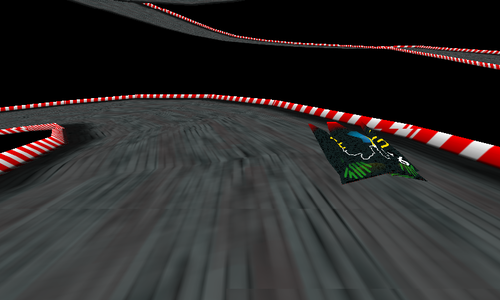
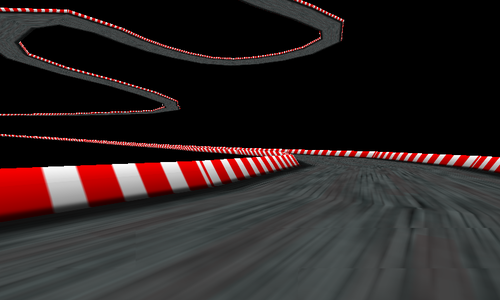
After I got the hang of it, I decided to come up with some fancy 90s-style hover racing game (only texturing, no lighting), or at least parts of it - right now, the small hovercraft just runs around the track and you can shift it left and right via the touchscreen and switching between normal and bird's view by pressing any hardware key.

As for the GL ES bindings (this is the interesting/useful part to developers who want to access the GL ES 2.0 API from Python), I put together a naive header-to-ctypes binding generator for the GL ES 2.0 API which you can run on "gl2.h" from the Qt SDK's Madde sysroot (too lazy to search for a working binding generator that surely exists somewhere out there already) - or just grab the generated "gles2.py" from the SwipEout source tarball. The result? Video it yourself.


You can grab the source code and miscellaneous files from the SwipEout website. The code was tested on the N900 and N950, you only need Python, PIL (python-imaging), PySide and the Open GL ES 2.0 libraries (libGLESv2.so) installed. Removing the PIL dependency and replacing it with Qt-based texture loading is left as an exercise for the reader. Enjoy :)

Samstag, 30. Juli 2011

N900 camera protip: Get rid of flash reflections

I think it was during MeeGo Conference 2010 when I was first told that I should cover the N900 camera cover's blue and silver bevel with a dark color to prevent them from reflecting the flash light and making the photos worse than they could be. If you don't use the N900 with flash at all, this "hack" doesn't apply to you. Otherwise read on. If you look at the N900's camera cover, you see that the camera hole is surrounded by a blue border on one side, and silver borders on the three other sides:


Now, when you take a photo with the flash, the flash light is reflected, which makes the taken photo to appear as if there was some smoke or fog in front of you. In reality it is the reflection of the bevel. So, take a black marker and take off the back cover of your N900 (you don't want to accidentally cover your camera lens with black color!):


Now carefully cover the silver parts around the camera hole (and the blue part too, ideally) with black color. The result should look like this:


You might get even better results if you take a marker with a finer tip or even use black spray paint or something. If you don't have a marker ready or do not want to paint on the back cover, you can also take off the back cover of your N900 (which has the same effect), but you will probably need a small magnet to trick the magnetic switch into reporting "camera cover opened" to the camera application.

Mittwoch, 11. Mai 2011

gPodder on the N900 MeeGo 1.2 Developer Edition

If you want to try the MeeGo N900 Developer Edition for the N900 but think that clicking through the Widgets Gallery gets boring after 45 minutes, why not try out the QML UI of gPodder on it? It's pretty easy. This post assumes that you are using the alpha release of the N900 Developer Edition from a microSD card and boot via USB.

Thankfully, Python 2.6 is already preinstalled, but you need recent PySide packages for gPodder to work (PySide exposes the Qt framework to the Python world), you can get them from PySide binaries for MeeGo. You don't need to upgrade Qt, simply installing the PySide packages is enough:

zypper addrepo http://download.meego.com/live/home:/renatofilho/Trunk/ pyside
zypper install python-pyside


What you need now is a recent Git checkout of gPodder's "tres" branch. I suggest you do that on your computer:

git clone git://repo.or.cz/gpodder.git
cd gpodder
git checkout tres


Now there are two pure Python dependencies for gPodder that you also need. As there are no packages for them in MeeGo yet, you also have to provide them manually. The first one is the Universal Feedparser. Grab a recent release from the downloads page and copy the file feedparser.py to the src/ folder in your gPodder checkout. The second dependency is mygpoclient, a client library for the gpodder.net web service. You can check out the latest version from Git:

git clone git://repo.or.cz/mygpoclient.git

In the checkout, you will find a folder called mygpoclient - copy this to src/ in your gPodder checkout. Now you have a complete, self-contained gPodder checkout on your computer. Use rsync or scp -r to copy it over to your N900 (you can use USB Networking for that).

Now that you have everything on your N900, you have to add some subscriptions manually (mostly because the QML doesn't yet have the UI required to subscribe to new feeds) - use bin/gpo to start the command-line utility, then do something like subscribe fb:linuxoutlaws to subscribe to an example podcast. Quit the command line application and start the QML UI using bin/gpodder --qml, which should - after some loading time - show gPodder/QML on your MeeGo 1.2 Developer Edition environment.

If you have made it this far, don't stop here - try out the examples from the PySide/QML Tutorial and familiarize yourself with Python development on MeeGo - it's easy and fun!

Mittwoch, 16. Februar 2011

Community SSU features to look forward to

I've been writing some patches for hildon-desktop (the window manager on Maemo 5). For some of the more useful ones, I've reworked them to be configurable via transitions.ini (and disabled by default), so they can be merged into the Community SSU. Most of these patches try to improve the user experience and look and feel of the Maemo 5 UI, but tastes differ, so you can choose which one to enable:
  • Blurless desaturation: With this feature enabled, the background of dialogs, menus, the launcher and the switcher won't get all blurry - instead, they keep their sharpness, but are darkened and desaturated. (thread with screenshots)
  • Bigger task switcher: I think this is one of my earliest patches, now cleaned up to be configurable with different settings. You can choose between the Maemo 5 default layout, the single-column "big" task switcher and the two-column task switcher. I've left the horizontal task switcher out of this, as it wasn't working that well in some situations. (thread with screenshots)
  • Rotation around the Z axis: This one makes the screen rotation look much more natural, just like on the MeeGo Handset UX. Instead of rotating around the X and Y axis, this makes the transitions from/to portrait mode rotate around the Z axis. (demo video)
  • Forced auto-rotation for all apps: By default, hildon-desktop obeys the preferences of application windows and whether or not they support portrait mode. With this option enabled, hildon-desktop ignores those preferences and instead assumes every application can be auto-rotated. There's no support for the home screen, launcher or switcher, as these things are more complicated to support in portrait mode. (demo video)
Assuming that MohammadAG will merge these patches into the Community SSU version of hildon-desktop (a few of these have already been merged), you will get to enjoy those features in a future update. Please note that all those features are disabled by default, and need to be enabled explicitly in transitions.ini. For some of these options, a restart (of the device or hildon-desktop) is required.

In other news, the Community SSU version of H-A-M (that's the Application Manager in Maemo 5) now supports portrait mode, and this might also be merged at some point (it already works with the "Forced auto-rotation" patch, there are just some graphical glitches in the main screen that are fixed by the patch). Anybody up for some HTML hacking to make Maps portrait-aware? Should be easy to do, but I won't work on that one. Contributions welcome :)

Donnerstag, 13. Januar 2011

New packages in Extras-Testing: gPodder 2.12, TV out control widget

gPodder 2.12 "The Odyssey of Flight 33" has been released, which is purely a bugfix release for those of you who found an empty podcast list after skipping a gPodder version during upgrades (this release fixes both the initial problem and tries to recover databases for which migration has failed). The updated package is also available in Diablo Extras already for N8x0 users. Please test and vote for gPodder 2.12-1 in Extras-Testing!

A new desktop widget written by Ville Syrjäl has been packaged for Extras. TV out control lets you control advanced features of the N900's TV out such as aspect ratio and scaling - those settings are not accessible from the official control panel applet, which is closed source (vote for that bug if you'd like to see it open sourced and improved through the Community SSU). Please test and vote for the TV out control widget in Extras-Testing!

Mittwoch, 29. Dezember 2010

qw 0.1 is now available for Maemo 5

My second new game this year - qw - has been released for Maemo 5 today. Version 0.1 (a tech demo, not a proper final release) gives you a sneak peek on the gameplay with 9 different levels and four-player support (if you hook up an external USB keyboard or get together really close for some N900 keyboard multiplayer action). The gameplay is simple: You need to control your player cursor (either via touchscreen gestures or keyboard) and enclose areas of the game with lines in order to fill them with a colored image. Beware of the enemies, as they will destroy your lines and split your points in half. If you enclose one or more small enemies, your points are multiplied.

A .deb for Maemo 5 is available from the qw homepage and packages for Symbian are also available. Try it out and send some feedback :) Enjoy!

Samstag, 4. Dezember 2010

Hildon UI elements in QML

I've been playing with PySide and QML this week (more on that soon), but here's something that might be interesting to the Maemo community: Using the native Hildon look and feel of Maemo 5 in QML.
This QML demo uses the current theme graphics of Hildon and provides QML components that can be used just like their Hildon counterparts, but inside QML UIs. This is not a complete library, just a test of what could be possible in case anyone wants to step up and create and maintain a Hildon library of QML components. Here's a video:
The code for this demo is on Github - you can try it out on your N900 using qmlviewer.

Dienstag, 2. November 2010

MaePadWeb 2.0: Take your MaePad anywhere (even on a N8)

The companion app to MaePad that has been announced some days ago is now available in Extras-Devel for your N900, with some nifty features:

  • Fully edit the checklists in your database
  • Native Maemo 5 look and feel in the browser (title bar, toolbar, lists, ...)
  • Dynamic themeing based on current Maemo theme
  • Per-session password for some security (inspired by MAD Developer)
MaePadWeb in a web browser

This means that if you are using the NSeries theme, it looks like this, but if you are using Digital Nature, this is how it looks (and that should work for all themes). On your device, you will see a simple info window. Now, that's bringing the Maemo 5 UI to your Desktop computer's web browser. But does it work on mobile devices as well? Of course! Let me present you MaePadWeb running in the Symbian web browser on a N8-00:

MaePadWeb on a N8-00

If you think that this looks shopped, check out the video for further proof and to see the checklist editor view in action :)

This project brings together some great technologies: Python (for the backend) and HTML/CSS and JavaScript (using JQuery for convenience) for the frontend. Apart from the artwork, it does not depend on anything from Maemo 5/Hildon that isn't available in MeeGo already. In fact, Python with SQLite3 support is the only real dependency of this app on the backend side. With all the confusion on what to use for MeeGo Handset UIs (MeeGo Touch Framework, QWidget-based Qt, QWidget inside QGraphicsView, QML, Qt Components, ...), the HTML/CSS/JavaScript combo seems like a good cross-platform alternative (you still have to run the backend somewhere, but it can run on the same device, of course). All you need is a good browser/JS engine/rendering engine combo (Fennec/QtWebKit on MeeGo Handset, MicroB on Maemo). This also works on the N8x0 with MicroB :)

Donnerstag, 28. Oktober 2010

MaePadWeb - A Web UI for MaePad running on your N900

One of the annoyances with task lists on mobile devices is that there is no easy way to view or edit your task list on your computer as well (there are some web services that allow for these things, but you have to trust your data to these services, and not all these services have a full-featured Maemo client app, and they mostly need to synchronize data between different clients).

So, what about having a simple HTTP server that you can start on your N900 and access from your computer's web browser to view and edit your MaePad checklists? Here's a short video of how it works at the moment:

Here's a screenshot of how the checklist view looks right now:

The MaePadWeb application will be available soon. On a related note, MaePad 1.8 is out now with live search support for the memo list - check it out and test it/vote for it!

Mittwoch, 6. Oktober 2010

Modifying the Maemo 5 task switcher and launcher

This will be the last post for this week, I promise ;) After playing around with the MeeGo Handset launcher and task switcher, I decided to have a look at how this could be implemented in Fremantle, because the big previews and the paginated launcher are easier to use in some cases (you can also checkout the contents of a window while scrolling by without having to activate it). hildon-desktop manages the task switcher and launcher, among other things. The results of two days of hacking are two patches:

What I'm missing right now and did not succeed in implementing straight away is the "snapping" of TidyFingerScroll to page boundaries, so that whenever a scroll operation is finished, it automatically scrolls to center the icon page (for the launcher) or a preview window (for the task switcher). Obligatory demo video (.debs and patches are linked from the threads above if you want to try it out yourself) here:

If you happen to have experience in Clutter, why not give it a try? I suppose you would just need to implement another scroll mode in TidyFingerScroll and then request this mode in hd-task-navigator.c and hd-launcher-page.c. Who's up for the challenge? :)

Random observation: Hidden in hd-task-navigator.c one can find a geeky gem:

  xthumb = ythumb = 0xB002E;

A new gPodder release should be ready next week. And now back to some Uni stuff :)

Dienstag, 5. Oktober 2010

Fast MeeGo Handset UX on a N900 (Video)

I've had the chance to play around a bit more with the MeeGo Handset UX on the N900 yesterday (1.1.80.0.20101001.1). Carsten provided experimental graphics drivers, which still crash at a few points, but for the first time provide acceptable performance in the UI. I also decided to build the gPodder MeeGo Touch Prototype UI against libmeegotouch. Unfortunately, there's no SDK yet, so I had to use zypper on the device (via SSH) to install libmeegotouch-devel, make and gcc-c++ and then take a long coffee break after entering qmake ; make. As it's using plain Qt, the TRG binary built from the Fremantle SDK worked fine on the device.

If you don't see the embedded video, click here: MeeGo Handset UX on a N900 (w/ TRG, gPodder UI test, HW-accelerated).

Montag, 4. Oktober 2010

Qt: Write once, #ifdef everywhere?

Despite what the title of this post might suggest, I really like Qt. But as a developer, I also know that "write once, run everywhere" isn't realistic without writing some special-cased platform-specific code. Qt does take care of many platform-specific things, and I think it's the closest you can get to "write once, run everywhere" right now.

This post should serve two purposes: To provide a real-world example of what needs to be done in the code for the app to work on both Maemo 5 and Symbian^3 (with example code), and to get suggestions on what parts I could rewrite in a more platform-agnostic manner with existing APIs (so please comment if you are in the know!).

Here's the story: In early September, I've rewritten my game "That Rabbit Game" to use QGraphicsView on the N900, and in the last weeks, I've ported it to Symbian^3. I use the macro Q_OS_SYMBIAN to check for Symbian and Q_WS_MAEMO_5 to check for Fremantle. Here's the current main menu on a N900 and N8 (different screen resolutions and aspect ratios):

Qt modules: In the qmake project file, I can use linux-g++-maemo5 to add Maemo-specific configuration, and symbian for Symbian-specific settings. I use D-Bus module on Maemo, but obviously not on Symbian, so my project file contains something like this:

linux-g++-maemo5 {
QT += dbus
}

This is nice, because I only have to maintain one project file, and the block structure is very readable (and I can even use different Qt submodules for each platform).

Screen orientation: Symbian has auto-rotation for Qt apps by default, and Maemo 5 has landscape-only mode by default. For my game, portrait mode does not make sense, so I have to request landscape-only on Symbian (similarly, if I want auto-rotation everywhere, I have to request it on Maemo 5 and do nothing in Symbian). For this specific case, I need some libs in Symbian, so I add this to the project file:

symbian {
LIBS += -lcone -leikcore -lavkon
}

I also need to add this to the top of my main source file:

#ifdef Q_OS_SYMBIAN
#include <AknAppUi.h>
#endif

And finally, I have to copy'n'paste a code block into my main() function before I create the first window:

#ifdef Q_OS_SYMBIAN
CAknAppUi* appUi = dynamic_cast<CAknAppUi*> (CEikonEnv::Static()->AppUi());
TRAPD(error,
if (appUi) {
// Lock application orientation into landscape
appUi->SetOrientationL(CAknAppUi::EAppUiOrientationLandscape);
}
);
#endif

It would be nice if Qt (or Qt Mobility?) has some generic API for this, where I just need to do something along the lines of QRotation::setMode(QRotation::LandscapeOnly); and let it take care of the platform-specific stuff.

Accelerated QGraphicsView: On Symbian^3, QGraphicsView is automatically accelerated via OpenVG (I think), but on Maemo 5, it can use OpenGL for this (but does not by default), so in the code where I create my QGraphicsView, I have to have this at the top:

#ifdef Q_WS_MAEMO_5
# include <QGLWidget>
#endif

And then somewhere down that file where I create the QGraphicsView, this code goes there:

#ifdef Q_WS_MAEMO_5
QGLWidget *glw = new QGLWidget(QGLFormat(QGL::DoubleBuffer));
view->setViewport(glw);
#endif

It's not that difficult, and is already cross-platform (on platforms where OpenGL is available), but maybe QGraphicsView can be OpenGL-accelerated on Maemo 5 by default. Maybe there is some non-obvious side effect that using an OpenGL viewport has that I'm not aware of, and that's why one has to do it manually.

Accelerometer readings: This might actually be a bug in Qt Mobility. For my game, I have to read the accelerometer's Y axis on Symbian, and its X axis on Maemo to determine the rotation for the same holding position of the device, so there's another platform-specific #ifdef there. Again, this will hopefully be fixed in a future release of Qt Mobility, and will most likely be fixed for MeeGo as well.

Task switcher: It's customary on Maemo to have a task switcher button in the upper left corner. There's no platform-agnostic way of going to the task switcher, so I needed to special-case it for Maemo 5, and have not bothered implementing it on Symbian^3 (suggestions welcome!). First, I need to include D-Bus headers for this (I've already mentioned how to request the D-Bus module in the qmake project file above) :

#if defined(Q_WS_MAEMO_5)
# include <QDBusConnection>
# include <QDBusMessage>
#endif

When I'm in the handler code where I need to do the actual task switching, I can utilize it to activate Maemo 5's task switcher:

#if defined(Q_WS_MAEMO_5)
QDBusConnection c = QDBusConnection::sessionBus();
QDBusMessage m = QDBusMessage::createSignal("/", "com.nokia.hildon_desktop", "exit_app_view");
c.send(m);
#endif

This is very much Maemo 5-specific, and will very likely not work on MeeGo Harmattan. Again, here it would be nice to have a cross-platform way of doing window management (in Qt or Qt Mobility?). I can imagine this being useful not only on handsets, but also on netbooks and tablets (from a MeeGo PoV). Again, trying to come up with pseudo-APIs here, QWindowManager::showTaskSwitcher(); could be a nice way to handle this in a cross-platform way, hiding platform-specific implementations. From what I've seen of MeeGo Touch, activating the task switcher there simply iconifies the window on the Desktop, so maybe if I would iconify my main window, it should activate the task switcher on Maemo 5 and Symbian. It does not work on Maemo 5 right now, though, and I haven't tested it on Symbian.

Screen resolution: This was (thanks to QGraphicsView) less of a problem than I thought it would be. Symbian^3 (or at least the N8) uses 640x360 as its resolution, and Maemo 5 uses 800x480. Maybe the MeeGo Harmattan device will use yet another resolution. I still configure my QGraphicsScene object manually via #ifdefs to get a good resolution, but the code could just measure the resolution and configure the scene as well. Here's what I use:

#if defined(Q_WS_MAEMO_5)
setSceneRect(0, 0, 800, 480);
#elif defined(Q_OS_SYMBIAN)
setSceneRect(0, 0, 640, 360);
#endif

I then use the sceneRect() of my scene to calculate a scale factor for all contents and call setScale() on all root items of the scene to scale the contents to the current screen size. You might have to take care of different aspect ratios on different devices, too - but it was unproblematic for my use case (the game) this time.